
Service · For integrators
Crestron Processor Monitoring
Know a client’s system is down before they call you. Processor Monitor watches every Crestron 4-Series processor you install, and the moment anything goes wrong it alerts you and your whole team.
See the demonstrationDemonstration
Every processor, one screen
This is the real dashboard a dealer sees after signing in: every processor across every client with its status, program, uptime and CPU. The screens on this page come from the actual product, shown with sample data so no client information is published.
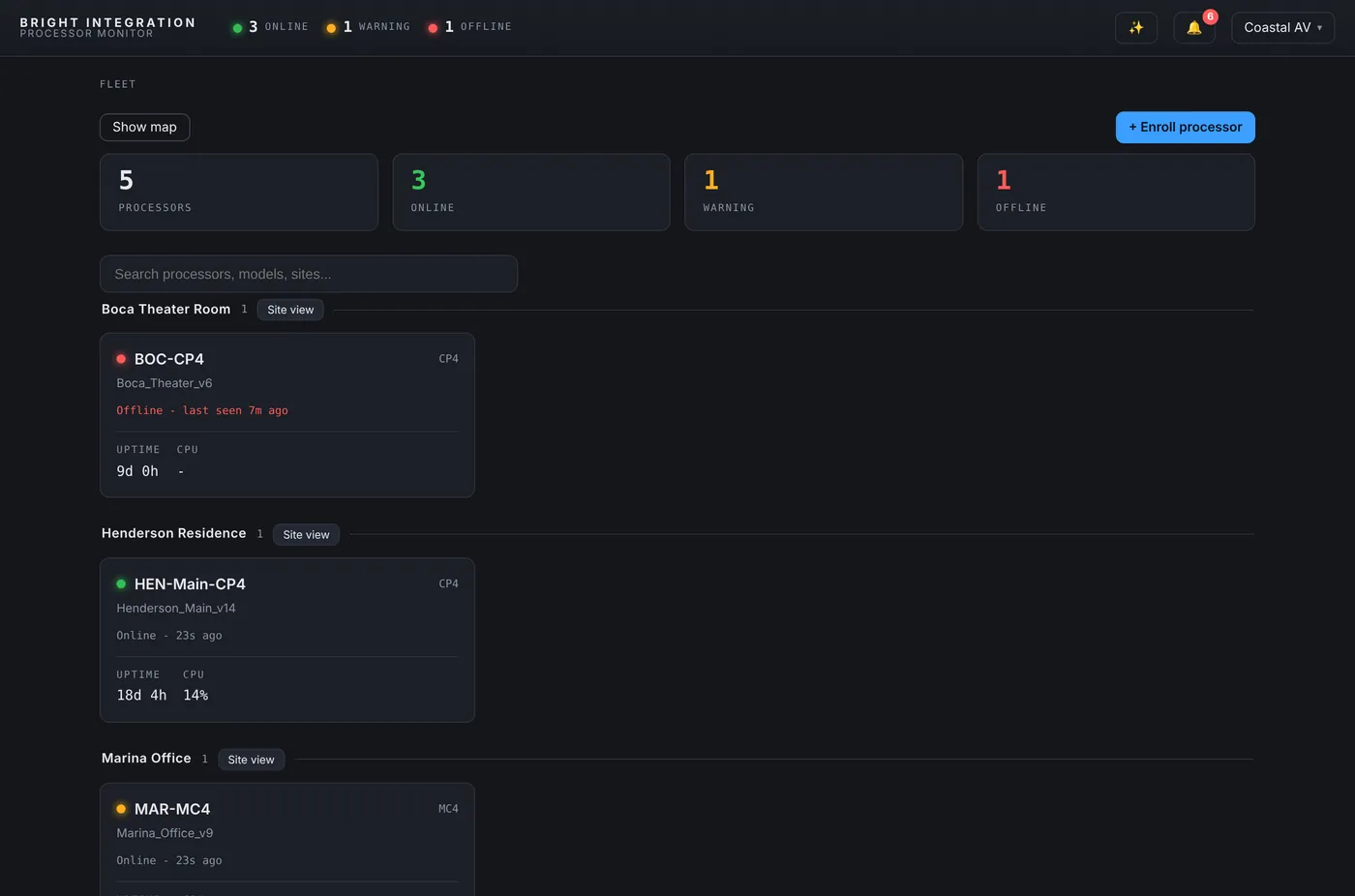
Open the interactive demo to click through it yourself. Any email and password signs in to the demo account.
Alerts
When anything goes wrong, your whole team knows
The moment a processor or device has a problem, Processor Monitor alerts the dealer and every team member assigned to that client, by push notification on their phone and by email. You hear about it first, and usually fix it before the client ever notices.
- 01
Push to every phone
Instant notifications on the phones of you and your techs.
- 02
Email to the team
A clear email with the client, the processor and what went wrong. The client’s own contacts can be included if you choose.
- 03
Rules per site
Turn each alert on or off per client, and set thresholds.
- 04
Maintenance Mode
Working on site? Pause alerts for one processor or the whole client.
What triggers an alert
- Processor offlineNo report for about 3 minutes.
- Program stoppedA program slot stops running.
- High CPULoad stays above your threshold.
- Device offlineA touch panel, NVX or any IP ID drops off.
- TemperatureA thermostat zone goes out of range.
- Low batteryRemotes and keypads running low.
- WattBox powerPower lost, unsafe voltage or UPS on battery.
- WattBox not reportingThe power unit stops responding.
- Sonos offlineA player stops reporting.
- NAX audio faultOver temperature, current, voltage or DC fault.
Inside the dashboard
More than a status light
Each part of the system has its own panel. Open any of them for the full details, screenshots and how it works.
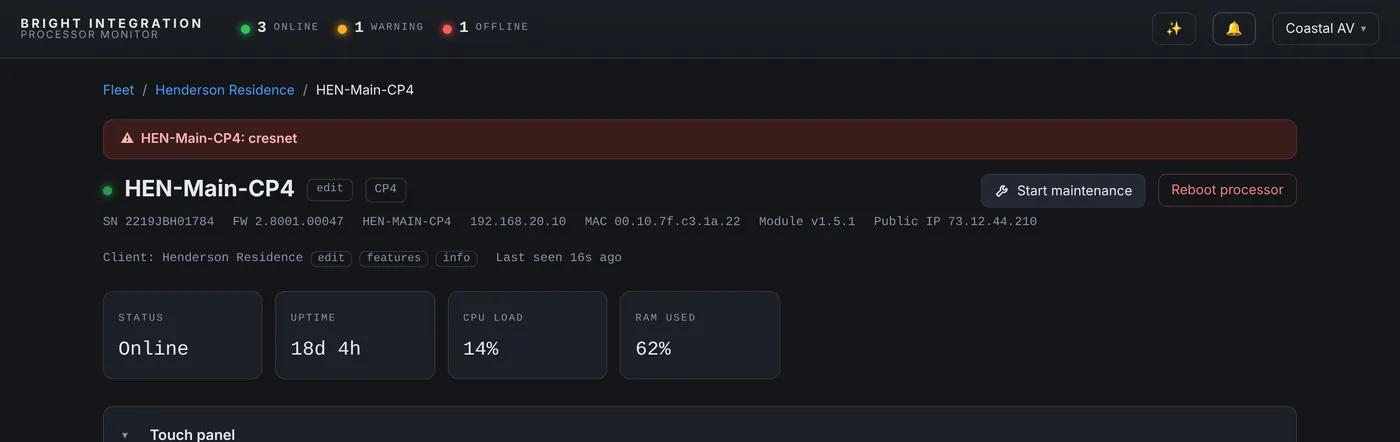 4-Series processorsCrestron 4-Series Processor MonitoringStatus, CPU, memory, programs, IP table, and every restart with its cause.
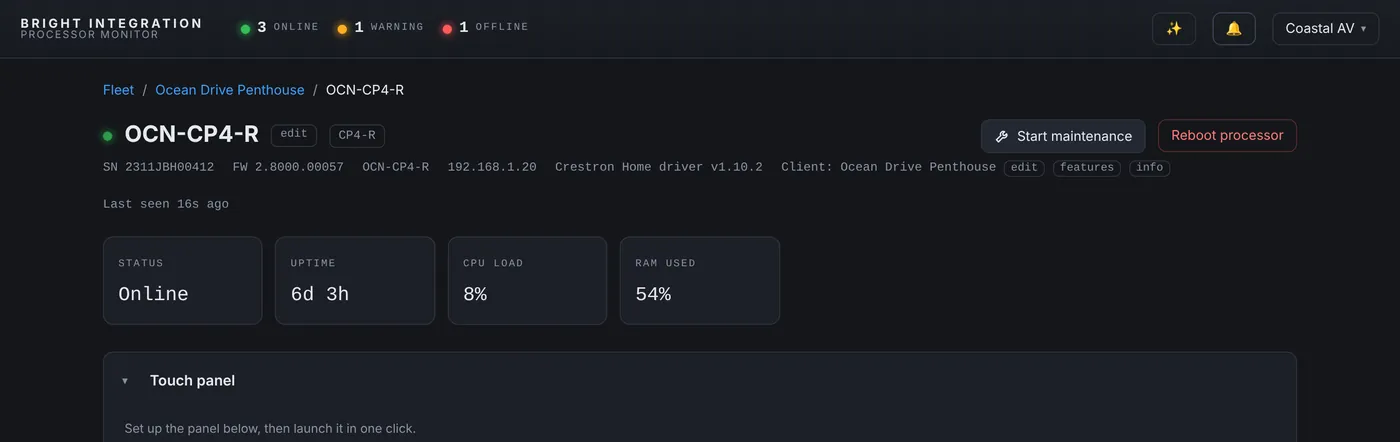 Crestron HomeCrestron Home MonitoringCP4-R and MC4-R through a Crestron Home driver, side by side with SIMPL systems.
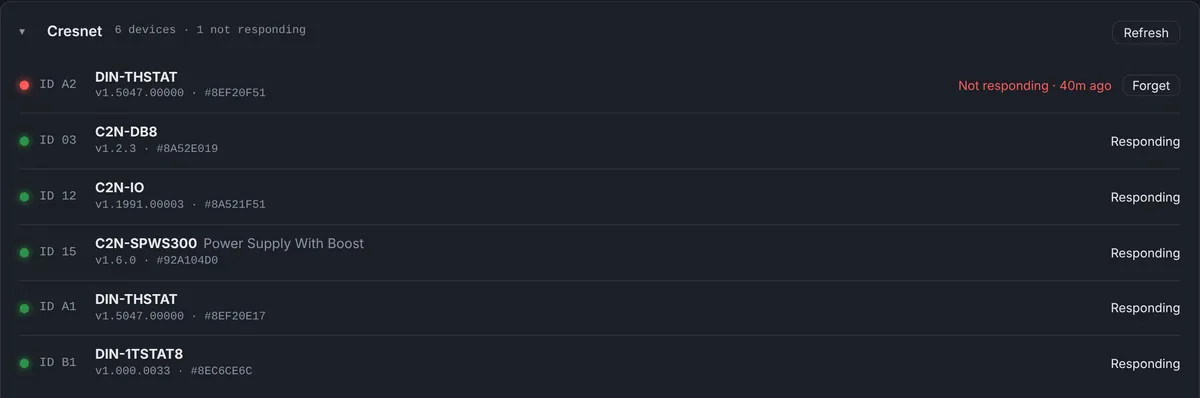 CresnetCresnet MonitoringEvery keypad, thermostat and power supply on the bus, with alerts and swap history.
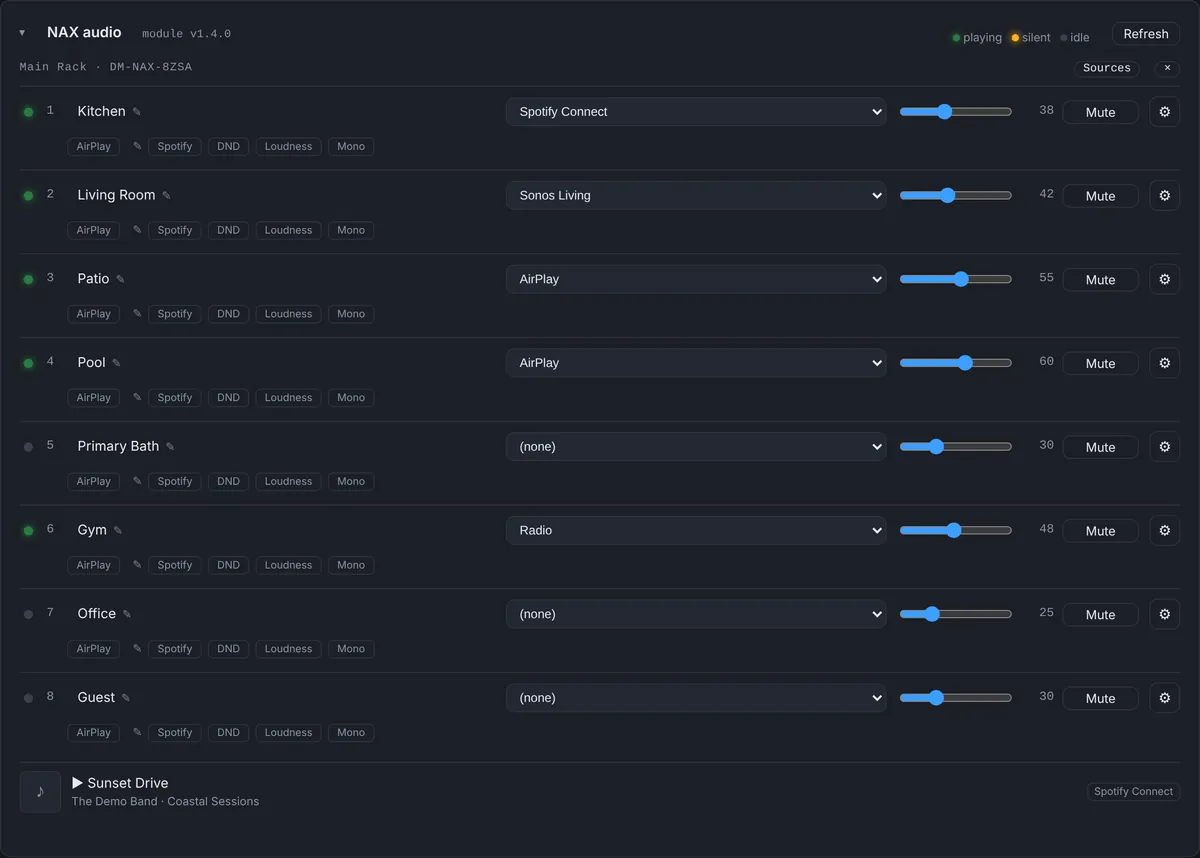 NAX audioCrestron NAX MonitoringZones, sources, volume, signal and faults, with remote control.
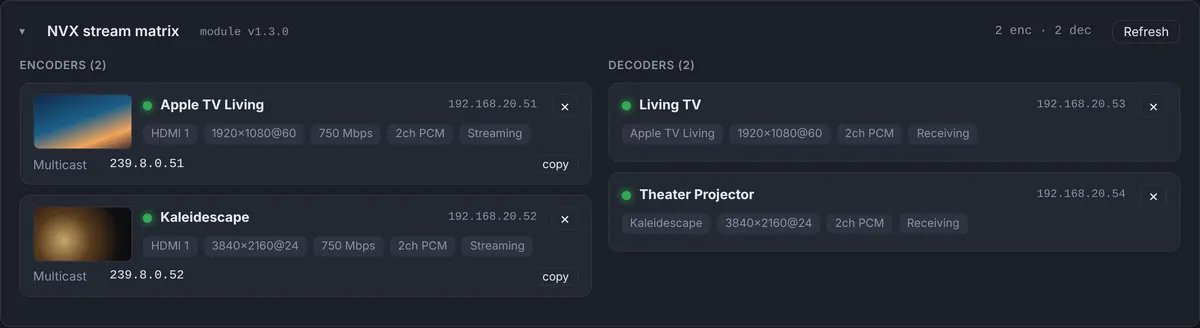 NVX videoCrestron NVX MonitoringA live stream matrix with previews of what each encoder is sending.
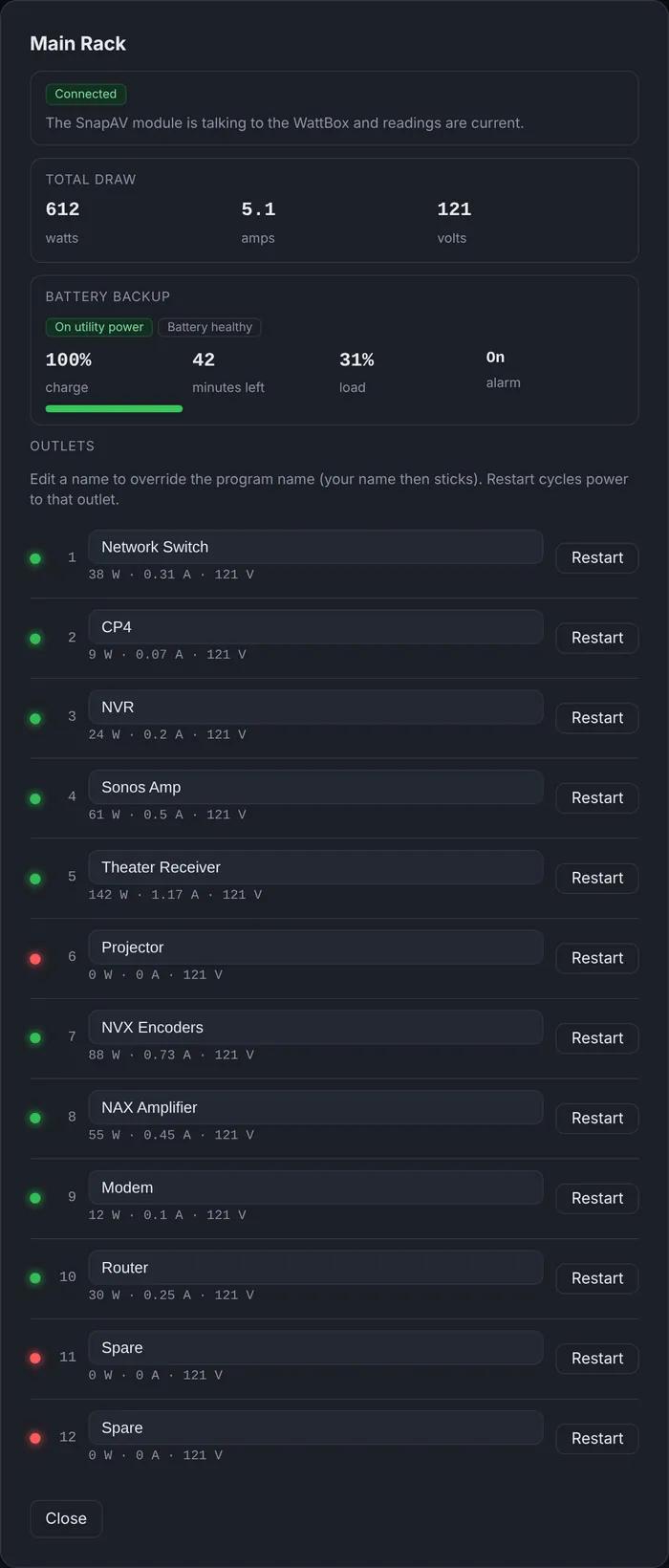 WattBox powerWattBox Monitoring Through CrestronOutlets, power draw, UPS and voltage, with remote outlet restart.
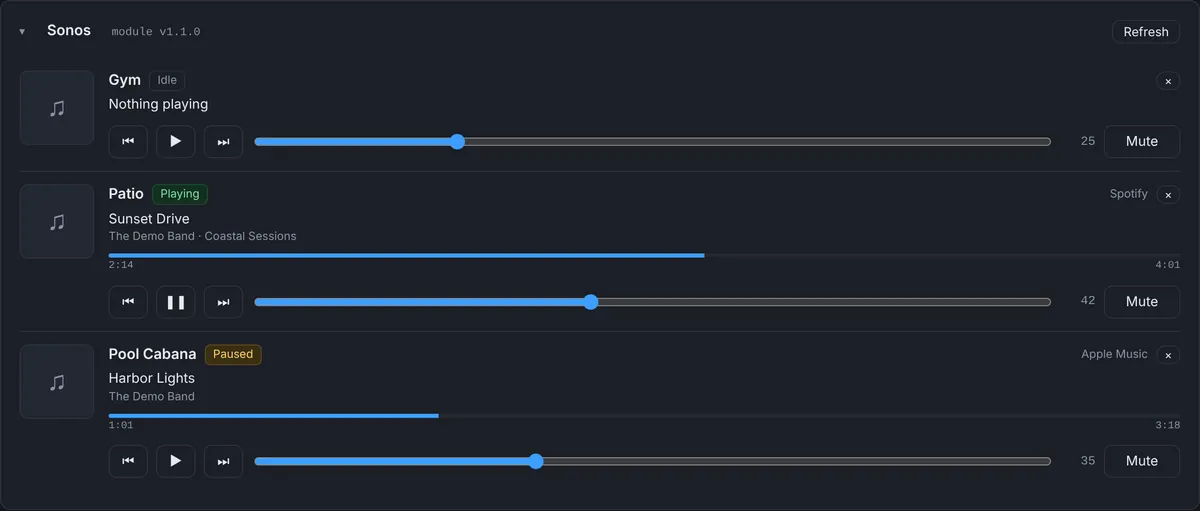 SonosSonos Monitoring Through CrestronEvery player, what it is playing, and an alert when one goes quiet.
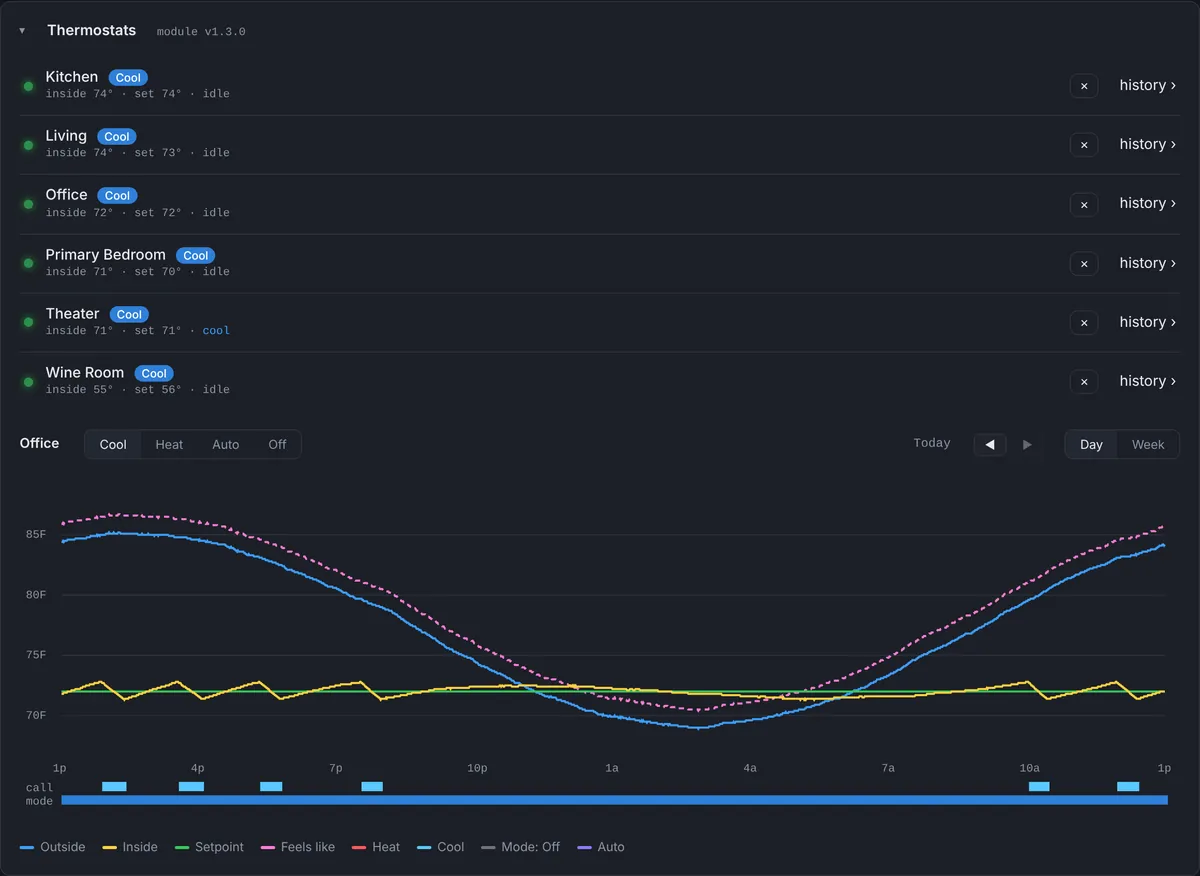 ThermostatsCrestron Thermostat Monitoring & HistoryMinute-by-minute history, setpoints, outside temperature and alerts.
 Remote console & rebootCrestron Remote Console Restart & RebootA safe console, program restart, processor and device reboot.
How it works
Installed in minutes
The agent runs in its own program slot, so your existing program is never touched.
- 01
Install the agent
Load the small agent program into a free program slot on the processor.
- 02
Enroll with a one-time code
Create the site in the dashboard and enter its code on the processor. Reporting starts securely over HTTPS.
- 03
Watch every site
Each processor reports every 60 seconds. Three missed reports, about 3 minutes, and it is flagged offline.
Everything included
Built for Crestron dealers
Supports Crestron 4-Series control processors such as the CP4, CP4N, PRO4, MC4 and RMC4, and Crestron Home processors such as the CP4-R and MC4-R. Every feature below is included in the one monthly price.
Monitoring
Know before the client calls
- Live fleet statusOnline, warning and offline for every processor, grouped by customer.
- CPU and memoryLive load with history graphs, so a slow climb shows up days early.
- AvailabilityOutage and restart history for every processor, built automatically.
- ProgramsEvery loaded program with its name, compile date and last update.
- Site devicesTouch panels and IP devices with online or offline status, by IP ID.
- Event log and timelineEvery status change, reboot and alert, per site, in order.
Alerts
The right person, right away
- Phone push alertsInstall the dashboard on your phone and get notified the moment a processor drops.
- Email alertsAlerts to your team, and optionally to the client's own contacts.
- Alert rulesOffline, high CPU, WattBox power, Sonos and audio rules you switch on per site.
- Maintenance ModePause alerts for one processor or a whole client while you work on site.
Remote tools
Fix it without a truck roll
- Remote consoleRun console commands from the browser, with dangerous commands blocked.
- Reboot and program restartRestart a program or the whole processor, confirmed and logged.
- DiagnosticsPull the error log and IP table on demand, no VPN needed.
- Launch the touch panelOpen the client's own XPanel interface straight from the dashboard.
- Network discoveryFind the devices and hosted panels on the client's network.
- Site files and notesKeep drawings, programs and notes with each job site.
System integrations
Beyond the processor
- ThermostatsLive readings and a temperature history graph per zone.
- Radiant heatFloor heating zones and slab temperatures.
- WattBox powerPer-outlet power, UPS and voltage safety, with outlet control.
- NAX audioZones, sources, volume, mute and tone, with full control.
- NVX stream matrixSee which NVX source feeds every display.
- Sonos and batteriesSonos player control, and battery levels for remotes and keypads.
Your team
Built for dealers
- Client Site ViewEvery processor at one house on a single page.
- Fleet mapAll your sites on a map, with live weather radar for storm days.
- Team membersInvite techs with access set per client, per tool. Nothing is on by default.
- Customer featuresTurn tiles on or off for each client so the view matches their system.
Security
Locked down by default
- Face ID and passkeysSign in with Face ID, Touch ID or Windows Hello.
- Two-factor sign-inRequired for the whole team if you choose.
- Password check on risky actionsReboots, restarts and console commands ask for your password again.
- Sign-in protectionLogin throttling, session time limits and a new sign-in email for every new device.
Pricing
One price, everything included
- Billed monthly per enrolled processor, through Stripe
- All features included
- No setup fee, no long-term contract
- Cancel anytime. Service runs to the end of the paid month
Questions
Processor Monitor FAQ
Which Crestron processors does Processor Monitor support?
Crestron 4-Series control processors running SIMPL Windows or SIMPL# Pro programs, such as the CP4, CP4N, PRO4, MC4 and RMC4, through the Bright Monitor Agent. Crestron Home processors such as the CP4-R and MC4-R are supported through a Crestron Home driver. 3-Series processors are not supported.
Do I have to change my Crestron program?
No. On 4-Series processors the agent runs in its own program slot and uses nothing from your program. Optional modules for NAX, NVX, thermostats, WattBox and Sonos are added to your program only if you want those panels.
What does the processor need on the network?
Outbound HTTPS to the dashboard. No port forwarding, VPN or router change is needed, and the processor’s admin password is never stored in the cloud.
How quickly will I know a processor is offline?
Each processor reports every 60 seconds. After three missed reports, about three minutes, it is marked offline and an alert goes out by push notification and email.
Who receives the alerts?
The dealer account owner, the team members assigned to that client, and optionally the client’s own contact. Each person can turn alerts on or off, and Maintenance Mode pauses them while you work on site.
What can I control remotely?
Restart a program, reboot a processor, restart a network device, cycle a WattBox outlet, change a NAX zone’s source and volume, control Sonos players, change a thermostat’s mode when the program allows it, and run console commands with dangerous commands blocked.
How much history is kept?
CPU, memory, availability and thermostat readings are kept minute by minute for 7 days, with day and week views. Daily summaries are kept on the calendar beyond that.
How much does it cost?
$99 per processor per month, billed through Stripe. Everything the processor reports is included, with no per-device fees. There is no setup fee and no contract, and you can cancel anytime; service runs to the end of the paid month.