Power, through the system you already programmed
If your Crestron program already controls a WattBox with the SnapAV module, Processor Monitor can read it without a separate cloud account or another login. The Bright WattBox module sits next to the SnapAV module in your program, reports what it knows to the dashboard, and passes outlet restarts back to it.
The WattBox password stays where it already is, in the SnapAV module on the processor. The dashboard never sees it.

What you see for each WattBox
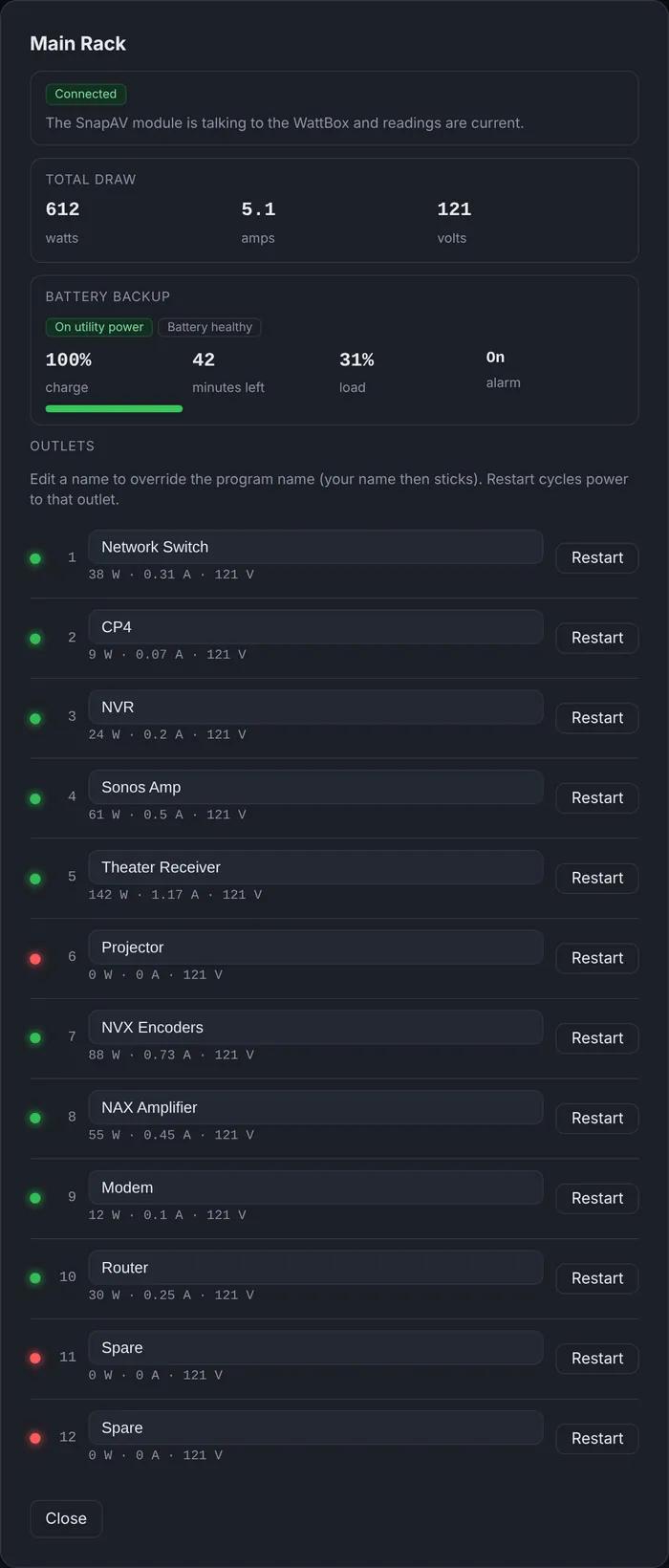
- Connection: whether the SnapAV module is talking to the box and the readings are current.
- Total draw: watts, amps and incoming voltage.
- Battery backup: on utility power or on battery, battery health, charge, minutes of runtime left, load and alarm state.
- Every outlet: its name, whether it is on, and its own watts, amps and volts on models that meter each outlet.
Restart an outlet from anywhere
Each outlet has a Restart button. The request goes to the processor, the Bright WattBox module pulses the restart for that outlet in the SnapAV module, and the box cycles the power. It is the fastest fix for a frozen streaming box, a router that stopped routing or a receiver that won’t turn on.
Outlet names come from your program, so they match what you already labeled. If a name changes on site, you can rename the outlet on the dashboard, and your name sticks from then on.
Alerts for power problems
As soon as a WattBox reports on a processor, two alert rules switch on by themselves:
- WattBox power: utility power lost and running on battery, with the charge and the minutes left; unsafe incoming voltage; or a UPS battery that needs replacing.
- WattBox not connected or not reporting: the SnapAV module lost the box, or no report has arrived for more than 5 minutes.
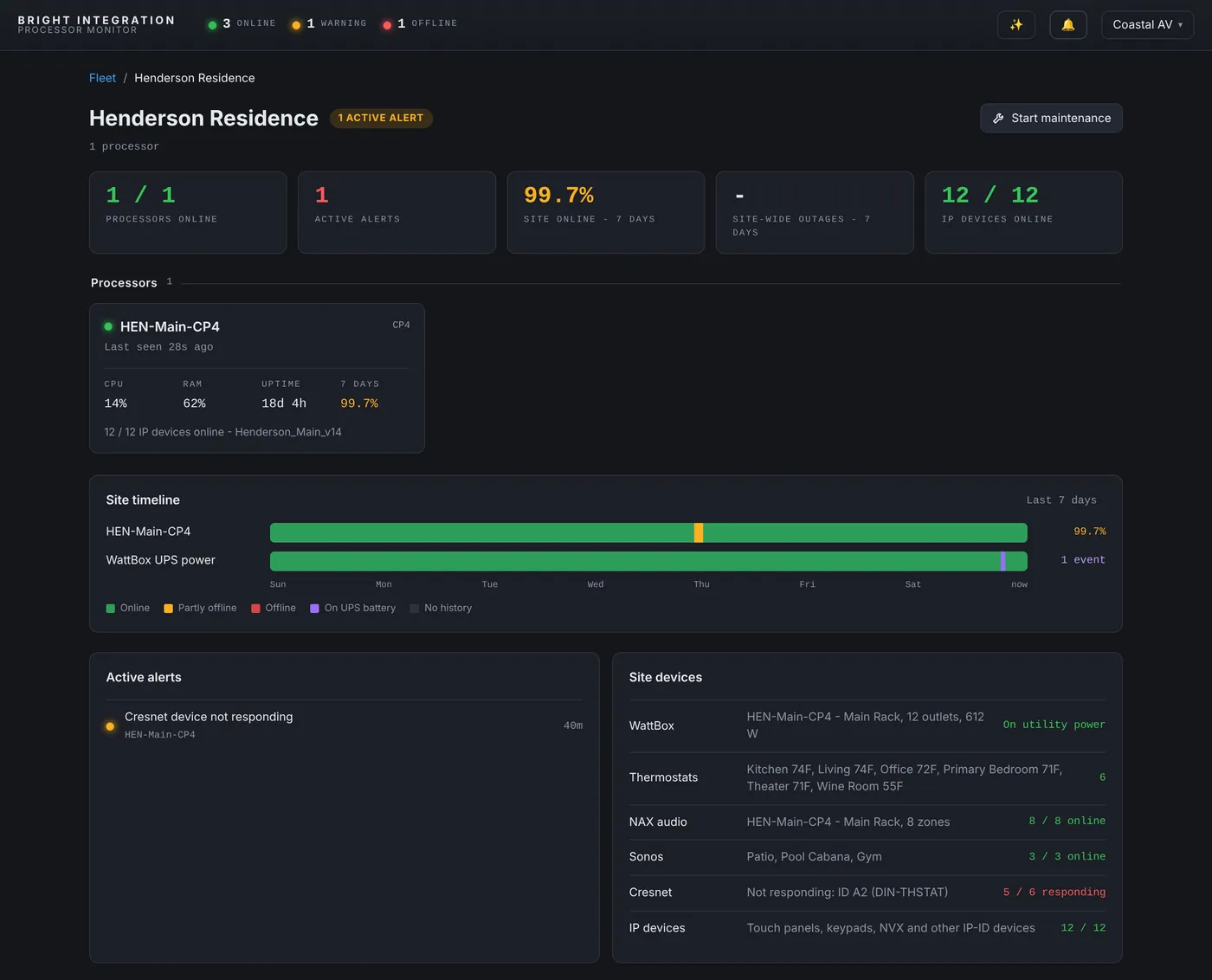
Every power change is written to the processor’s event log, such as “utility power lost - running on battery (100% charge, about 42 min left)” followed by “utility power restored”. On the Client Site View, the site timeline shows the periods the rack spent on UPS battery next to the processor’s own availability.
Why this matters in South Florida
Afternoon storms and brief power cuts are part of life here. A rack on a UPS rides through most of them, but you want to know when it is on battery, how long it has left, and whether the battery is still healthy. An alert that says the rack has been on battery for 20 minutes with 22 minutes left lets you call the client before the system shuts down, not after.
What you need
A WattBox controlled by the SnapAV module in a 4-Series program, and the Bright WattBox module next to it. Per-outlet metering and UPS data come from WattBox models that provide them; module 1.2.0 or later reports them.
Setting it up
- Add the Bright WattBox module next to the SnapAV WattBox module in your 4-Series program.
- Load the program. The module reports through the Bright Monitor Agent already on the processor, so there is nothing else to enroll.
- The WattBox alerts turn themselves on at the first report, and the outlets appear with the names from your program.
Name the outlets for the person on the phone
An outlet called “Outlet 6” is no help at 9 PM. Names like “Living Apple TV”, “Network switch” or “Theater amp” let any technician on your team restart the right device without opening the rack drawing, and they make the event log readable months later.
The power calls this answers
“The Apple TV is frozen”
Find its outlet, press Restart, and watch the outlet’s draw drop and come back. If the device recovers, the call is over in a couple of minutes.
“Nothing works after the storm”
The event log shows whether the rack went on battery, for how long, and when utility power came back. If the UPS ran out, the processor’s availability shows the gap, and the restart that followed is labeled as a power or network outage.
“The UPS keeps beeping”
Battery health and alarm state are on the WattBox tile. A battery that needs replacing raises the WattBox power alert, so you can bring a battery on the next visit instead of making a separate trip.
Power draw as a diagnostic
Each outlet’s watts tell you more than on or off. An amplifier drawing almost nothing when it should be playing is off or in protection. A device drawing much more than usual deserves a look before it fails. And comparing an outlet’s draw before and after a restart confirms the restart really happened.
Questions
Is the WattBox password stored in the cloud?
No. It stays in the SnapAV module on the processor. The dashboard only asks the processor to pulse a restart.
Can I restart an outlet when the processor is offline?
No. Restarts go through the processor, so it needs to be online. That covers the most common case: a frozen device behind a working system.
Which alerts are on by default?
WattBox power and WattBox not connected / not reporting, as soon as a WattBox reports.
Do I need a WattBox cloud account?
No. Everything goes through the SnapAV module already in your Crestron program.
What happens to the alerts during a long power outage?
The WattBox power alert tells you the rack is on battery, with the charge and minutes left. If the UPS runs out and the processor goes down, the processor offline alert follows, and both resolve on their own when power is back and the system reports again.
Part of Processor Monitor, the Crestron monitoring dashboard for dealers. $99 per processor per month, every feature included.